Kubernetes Discovery Is Easy. Knowing What Talks to What Is the Hard Part.
Listing what runs on a Kubernetes cluster is a solved problem. Point an API token at the cluster and you get every Deployment, Service, and Ingress in seconds.
The question that actually matters in a CMDB isn't "what's running?" It's "what depends on what?" — and on Kubernetes, that's where most tools quietly give up.
Why Kubernetes Breaks Traditional Discovery
A traditional server is stable. It has a hostname that doesn't change, an IP that sticks around, and software installed in a registry you can read. Discovery tools were built for that world.
Kubernetes is the opposite of that world:
| Traditional Server | Kubernetes |
|---|---|
| Stable hostname & IP | Pods get random names and new IPs on every restart |
| Installed packages persist | Immutable container images, replaced on deploy |
| Scale = add a server (days) | Scale = add replicas (seconds) |
| The server is the unit | The pod is disposable; the Deployment is the unit |
So the first rule of Kubernetes discovery: don't track pods. A pod named frontend-7b4d9f-xk2pq will be gone by next week. The stable, CMDB-worthy thing is the Deployment — the long-lived definition of what should be running. Pods are just runtime detail, like process PIDs.
The Easy Layer: Structure
The Kubernetes API hands you the structural tree for free, and it maps cleanly into a CMDB:
Cluster
 └── Namespace
      ├── Workload (Deployment / StatefulSet / DaemonSet)
      ├── Service
      └── Ingress
Tripl-i models this as a containment hierarchy — a Cluster contains Namespaces, a Namespace contains its Workloads, Services, and Ingresses — and enriches existing Server CIs (the nodes) with Kubernetes metadata instead of creating duplicates. If your SSH or vCenter scanner already found the node, the Kubernetes scanner just adds kubelet version, container runtime, pod capacity, and roles to the CI you already have.
Container images become real software, too. postgres:16.1 flows into the software catalog, gets CPE-matched, and inherits the entire vulnerability pipeline — the same CVE matching your traditional servers get. No special case.
That's the inventory. It's useful. It's also the part everyone can do.
The Hard Layer: Runtime Dependencies
Here's the question discovery can't answer from the API alone: when this workload runs, what does it actually call?
The Kubernetes API knows what's declared — which Service selects which pods. It has no idea that your checkout service calls payments, which calls an Oracle database on a VM outside the cluster, which calls a third-party gateway over HTTPS. That's runtime behavior, and capturing it on Kubernetes is genuinely hard. We tried three ways. The first two have real limits worth understanding.
Attempt 1: Read the node's connection table
The obvious move: the node is a Linux box, so read /proc/net/tcp over SSH like any server.
It doesn't work on a modern CNI. With Cilium (and similar), every pod lives in its own network namespace. The node's host namespace doesn't see the pod's outbound sockets at all. Result: your workloads show up as connection destinations but never as sources. You see half the conversation.
Attempt 2: Trace the connect() syscall with eBPF
Better idea: hook the kernel. Tools like Tetragon use eBPF to watch the connect() syscall and emit an event every time a process opens a TCP connection. Language-agnostic, kernel-level, no pod access required. We shipped this — and it's great for one specific thing: new, outbound, extra-cluster connections. Workload → external database, workload → third-party API. Captured cleanly.
But connect() tracing has two blind spots that matter enormously:
- Warm connection pools. A JBoss or Spring Boot app opens its database and service connections once at startup and reuses them for hours. During any given observation window, no
connect()fires — the connections already exist. The single most important dependency (app → its database, app → its peer service) is invisible precisely because it's healthy and busy. - Intra-cluster traffic. Cluster security policies often scope syscall tracing to non-cluster destinations, and the CNI's socket load-balancer can intercept service traffic before the syscall even fires. So
service-A → service-Binside the cluster — the core of your dependency graph — simply isn't there.
eBPF syscall tracing tells you about cold, outbound, external connects. It's blind to warm, internal, steady-state traffic. That's backwards from what you want.
Attempt 3: Observe the datapath, not the syscall
The fix is to stop watching syscalls and watch flows. Cilium's Hubble layer observes the eBPF datapath — actual packets moving — not connection setup. An established, busy connection emits flow records continuously, regardless of when it was opened or what language opened it.
That single shift solves both blind spots at once:
- Warm pools? Visible — the packets are flowing, so the flow is recorded.
- Intra-cluster
service-A → service-B? Visible — it's datapath traffic like any other. - JBoss vs Spring Boot vs Go vs Node? Doesn't matter — it's the network layer, not the app layer.
Tripl-i consumes these flows (directly, or via the flow metrics most clusters already export to Prometheus), aggregates them to the Deployment level, and writes them into the CMDB as Connected To relationships with the runtime evidence attached. Pod IPs are resolved back to their workloads; destinations outside the cluster resolve to the Server, database, or external-system CIs your other scanners already discovered.
The result is the dependency graph that the API can't give you and syscall tracing can't complete: frontend → api → cache, api → database-on-a-VM, payment-service → external gateway — warm pools and all.
From Dependencies to Service Mapping
A dependency graph is the input. A business service is the output.
On Kubernetes, the mapping is unusually clean, because the cluster already organizes itself by application. A namespace is, in practice, an application boundary. So Tripl-i can turn a namespace into a Business Service deterministically — no pattern-guessing required:
- Members come from the containment tree — the workloads the namespace contains.
- Internal tiers come from intra-namespace
Connected Toedges —web → api → cachefalls right out. - Service-to-service dependencies come from cross-namespace edges — and become Business-Service-to-Business-Service links. "The Checkout service depends on the Identity service."
- External & data dependencies come from edges leaving the cluster — the Oracle RAC, the partner APIs, the legacy SQL Server on a Windows VM.
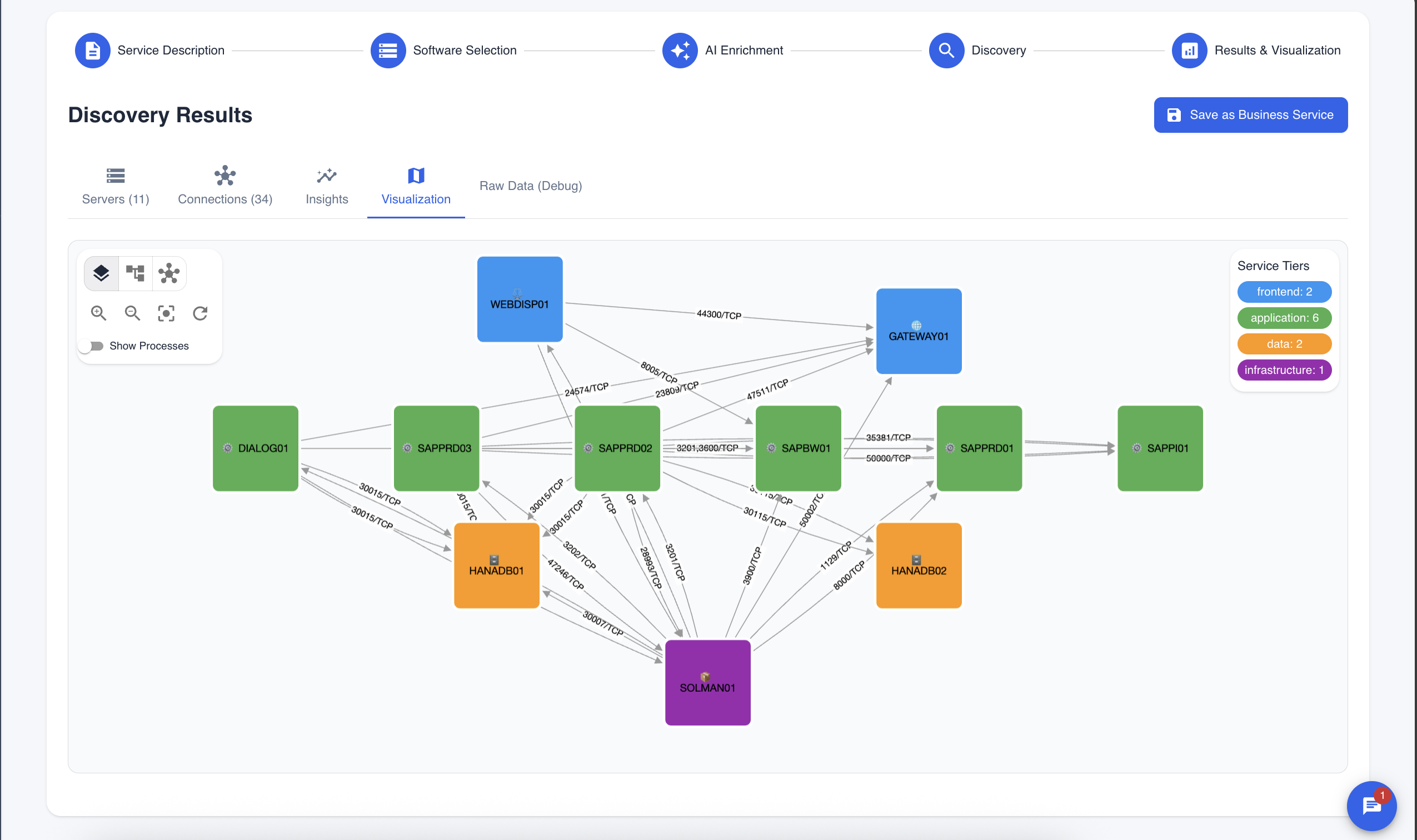 Same cluster. Now you can see which workloads form a service, and what that service depends on — inside and outside the cluster.
This is the part no API and no single eBPF tool gives you: a service map that crosses the boundary between Kubernetes and everything else you run.
Why the Boundary Is the Whole Point
The highest-value dependencies are almost always the ones that cross a boundary — and they're the ones nobody documents:
- A Kubernetes workload depending on a database on a Windows VM discovered by your WMI scanner.
- A workload calling a third-party payment gateway over HTTPS.
- A legacy app server reaching into the cluster through a NodePort.
When you can patch a SQL Server on a VM and immediately see every Kubernetes workload that will feel it — alongside the traditional servers that will feel it — that's not a prettier graph. That's change impact analysis that finally tells the truth.
The Bottom Line
Kubernetes discovery is table stakes. Anyone can list your Deployments.
The value is in the question that comes next — what breaks when this goes down? — and answering it on Kubernetes means seeing warm, internal, steady-state traffic that the API never declares and syscall tracing never catches. Get that right, roll it up to the service level, and connect it to the rest of your estate, and your CMDB stops being an inventory of containers and starts being a map of your business.
That's not a discovery question. It never was.
Curious how Kubernetes fits into a single CMDB alongside your servers, databases, and cloud? Explore the documentation or see the platform.