CPE Dictionary
The CPE (Common Platform Enumeration) Dictionary is a structured naming scheme for information technology systems, software, and packages. Tripl-i uses CPE identifiers to accurately match discovered software with known vulnerabilities.
Accessing the CPE Dictionary
- Navigate to SAM in the main menu
- Under Vulnerability Management, click CPE Dictionary
Understanding the CPE Dictionary
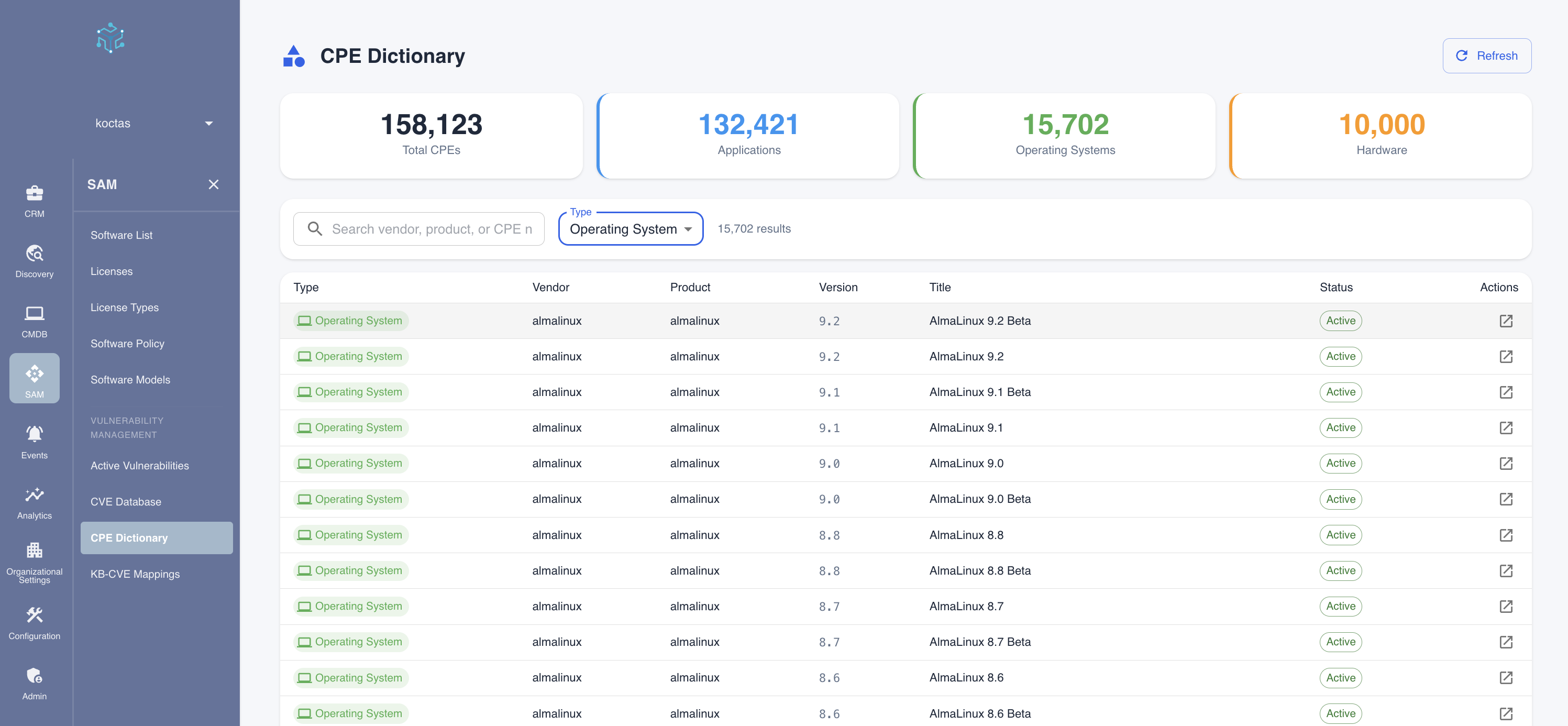
Summary Statistics
The top of the page displays counts by CPE type:
| Metric | Description |
|---|---|
| Total CPEs | Complete count of CPE entries in the dictionary |
| Applications | Software applications (part='a') |
| Operating Systems | Operating systems (part='o') |
| Hardware | Hardware devices (part='h') |
Filtering Options
Use the filter controls to narrow down the dictionary:
- Search: Search by vendor, product name, or CPE identifier
- Type: Filter by CPE type (Application, Operating System, Hardware)
Understanding CPE Structure
CPE identifiers follow a standardized format. For example:
cpe:2.3🅰️microsoft:edge:120.0.2210.91:*:*:*:*:*:*:*
Breaking this down:
| Component | Value | Meaning |
|---|---|---|
| cpe:2.3 | Version | CPE specification version |
| a | Part | Application (a), Operating System (o), or Hardware (h) |
| microsoft | Vendor | Software vendor name |
| edge | Product | Product name |
| 120.0.2210.91 | Version | Specific version |
| * | Update | Update/patch level (wildcard = any) |
| * | Edition | Product edition |
| * | Language | Language |
| * | SW Edition | Software edition |
| * | Target SW | Target software |
| * | Target HW | Target hardware |
| * | Other | Other attributes |
CPE Table Columns
| Column | Description |
|---|---|
| Type | Application, Operating System, or Hardware |
| Vendor | Software vendor or manufacturer |
| Product | Product name |
| Version | Specific version number |
| Title | Human-readable product title |
| Status | Active or deprecated |
| Actions | View details or related CVEs |
Using the CPE Dictionary
Verify Software Identification
When reviewing discovered software, you can verify how it's being identified:
- Search for the software name
- Verify the CPE matches the installed version
- Check that the vendor mapping is correct
Research Affected Products
To understand which products are affected by a specific vulnerability:
- From a CVE entry, note the affected CPEs
- Search the CPE Dictionary for those identifiers
- Verify if the products match your inventory
Troubleshoot Vulnerability Matching
If vulnerabilities aren't appearing as expected:
- Find the software in the CPE Dictionary
- Verify the version information is correct
- Check if the CPE is marked as Active
- Review related CVEs for that CPE
CPE Types Explained
Applications (Part = 'a')
Software applications including:
- Web browsers (Chrome, Firefox, Edge)
- Office suites (Microsoft Office, LibreOffice)
- Development tools (Visual Studio, Eclipse)
- Utilities and tools
- Server applications (Apache, MySQL, SQL Server)
Operating Systems (Part = 'o')
Operating systems including:
- Windows Server versions
- Windows Desktop versions
- Linux distributions (Ubuntu, RHEL, CentOS)
- macOS versions
- Unix variants
Hardware (Part = 'h')
Hardware devices including:
- Network equipment (routers, switches)
- Printers and peripherals
- IoT devices
- Specialized equipment
How CPE Matching Works
Tripl-i automatically matches discovered software to CPE identifiers:
- Discovery: Software name and version collected during scans
- Normalization: Software names are standardized
- CPE Lookup: Matching CPE identifier is found
- CVE Correlation: Related vulnerabilities are identified
- Version Checking: Only vulnerabilities affecting the specific version are reported
Version-Aware Matching
Not all vulnerabilities affect all versions. Tripl-i checks:
versionStartIncluding- First affected versionversionEndExcluding- First fixed versionversionStartExcluding- Versions after this are affectedversionEndIncluding- Last affected version
This ensures only relevant vulnerabilities are reported for your specific software versions.
Refreshing the Dictionary
Click the Refresh button to synchronize the latest CPE data. This updates:
- New products added to the dictionary
- Version updates for existing products
- Deprecated CPE identifiers
The CPE dictionary is updated automatically, but you can manually refresh after major software deployments to ensure new applications are properly identified.
Related Topics
- Active Vulnerabilities - Managing discovered vulnerabilities
- CVE Database - Exploring vulnerability details
- KB-CVE Mappings - Windows patch mapping