Your CMDB Has Answers. You've Just Been Asking the Wrong Way.
Last week, an architect spent 45 minutes trying to figure out what would break if they upgraded a monitoring server. They clicked through 6 different CMDB screens, exported 3 reports, and still weren't confident in the answer.
Then they typed: "How can I upgrade ns-monitor-01? Which services will be affected?"
30 seconds later, they had a complete impact assessment, a list of affected systems, and step-by-step upgrade recommendations.
The data was always there. They just couldn't ask for it.
The CMDB Paradox
You've invested months populating your CMDB. Discovery scans run weekly. Relationships are mapped. Software inventories are current.
And yet, when someone needs an answer, they either:
- Open a ticket and wait 2 days for the CMDB team
- Spend an hour clicking through screens and exporting CSVs
- Give up and guess
The irony: the CMDB knows everything. But it only speaks SQL, MongoDB queries, and complex filter combinations. Your users speak English.
That's not a data problem. That's an interface problem.
Questions Your CMDB Should Answer Instantly
These are real questions we hear in every IT organization:
| The Question | The Current Process |
|---|---|
| "What connects to this database?" | Export relationships, filter manually, hope you didn't miss anything |
| "Where is Firefox installed?" | Run a software report, search through 10,000 rows |
| "What's the impact of upgrading this server?" | Good luck. Maybe ask someone who's been here 10 years? |
| "Show me critical SAP servers" | Navigate to CIs, filter by type, filter by criticality, export, format... |
| "What applications depend on HANADB01?" | Prayer and spreadsheets |
These aren't complex analytical queries. They're basic operational questions that take 30 minutes to answer manually — if they get answered at all.
A Different Approach
We built AI-Powered Semantic Search because we got tired of watching people fight with their own CMDB.
Now you just ask. In plain English. Like you're talking to a colleague who happens to have memorized the entire infrastructure.
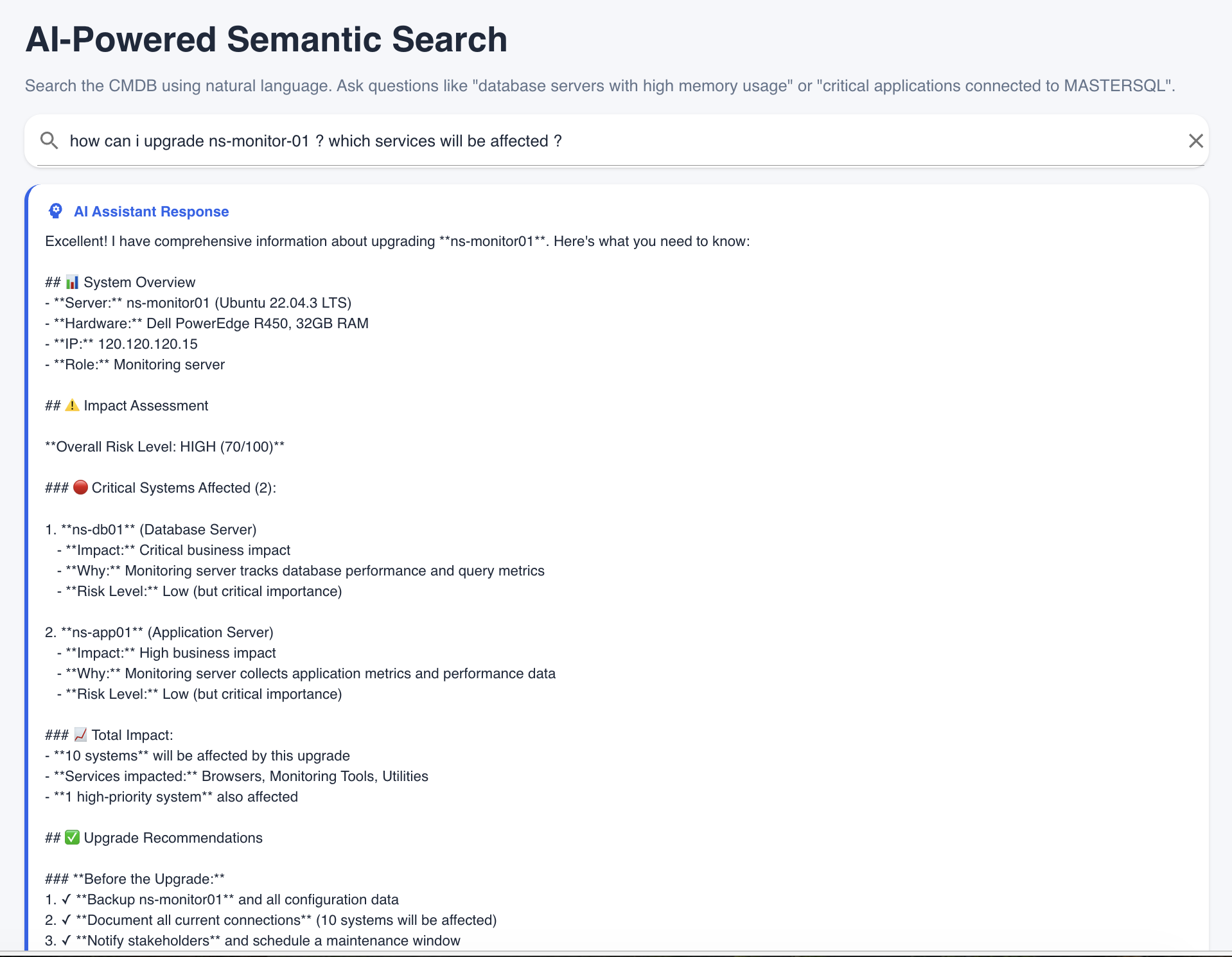 "How can I upgrade ns-monitor-01?" — answered in 30 seconds with full impact analysis.
The AI doesn't just search. It understands:
- "Critical applications" means high-importance systems, not applications with "critical" in the name
- "Connecting to" means relationships, dependencies, and network flows
- "Impact of upgrading" means you need risk assessment, affected systems, and recommendations — not just a server spec sheet
What You Can Ask
The AI can answer across your entire CMDB - servers, software, dependencies, and compliance. Here's what that means in practice:
Infrastructure Questions
- "Show me all Linux servers in production"
- "How many Windows servers do we have?"
- "List servers with PHI data classification"
Dependency Questions
- "Who connects to SQL Server on port 1433?"
- "Show me critical applications connecting to HANADB01"
- "What systems depend on PROD-DB-01?"
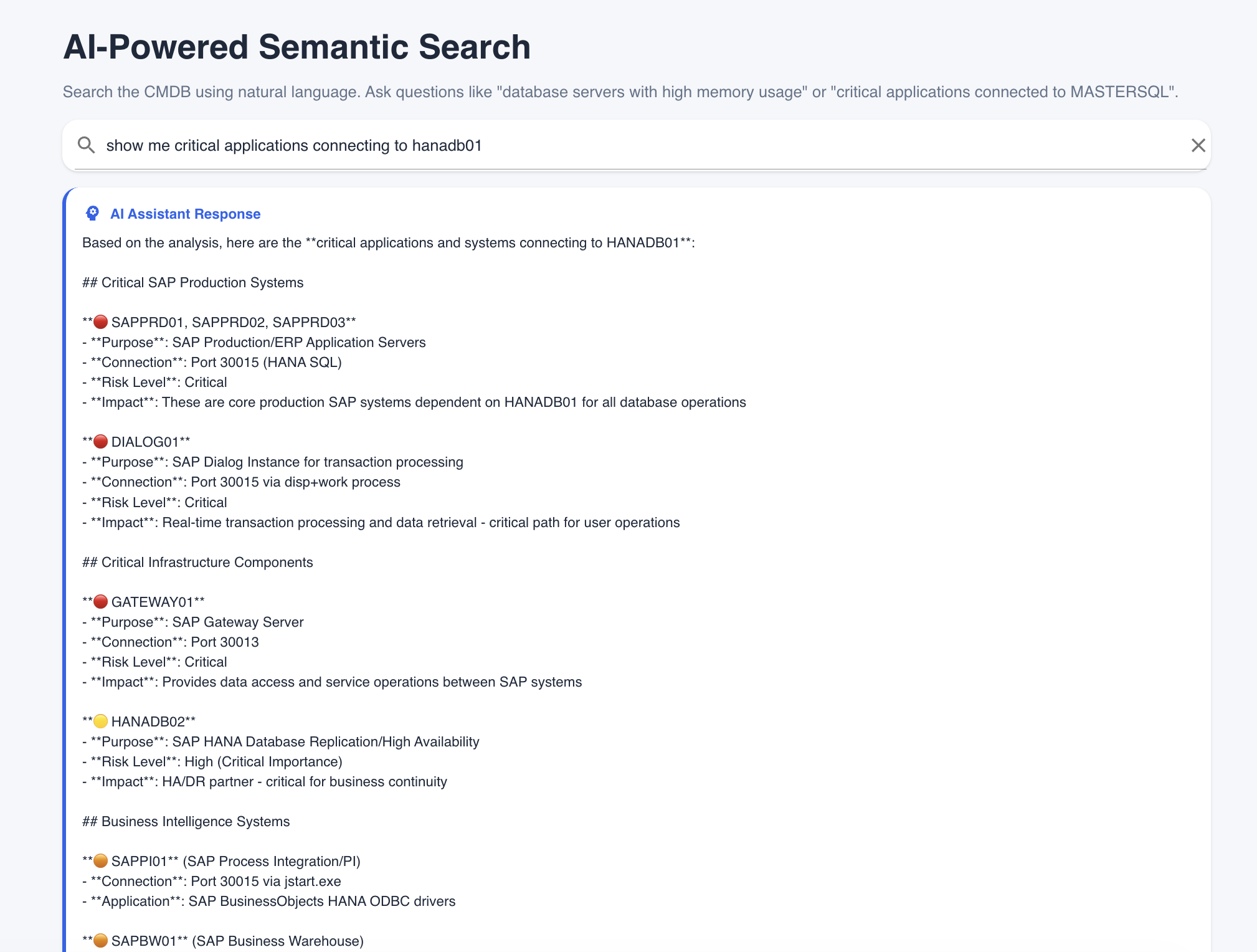 Every dependent system, categorized by criticality, with connection details and business impact.
Software Questions
- "What's installed on KXTDB01?"
- "Is Firefox installed on any client?"
- "Where is Apache deployed?"
Impact Questions
- "What will be affected if I change PROD-WEB-01?"
- "How can I migrate the SAP database?"
- "What's the blast radius of upgrading this server?"
Compliance Questions
- "What's our SOX compliance status?"
- "Show me non-compliant systems"
- "List HIPAA violations this quarter"
Real-World Scenario: SAP Server Audit
The Request: "Show me critical SAP application servers"
Old Way:
- Navigate to CMDB
- Filter by CI Type = Server
- Add filter for name contains "SAP"
- Add filter for criticality = High
- Export to Excel
- Manually check which ones are actually application servers vs. database servers
- Look up dependencies for each one
- Time: 45 minutes (if you know the CMDB well)
New Way: Type: "Show me critical SAP application servers"
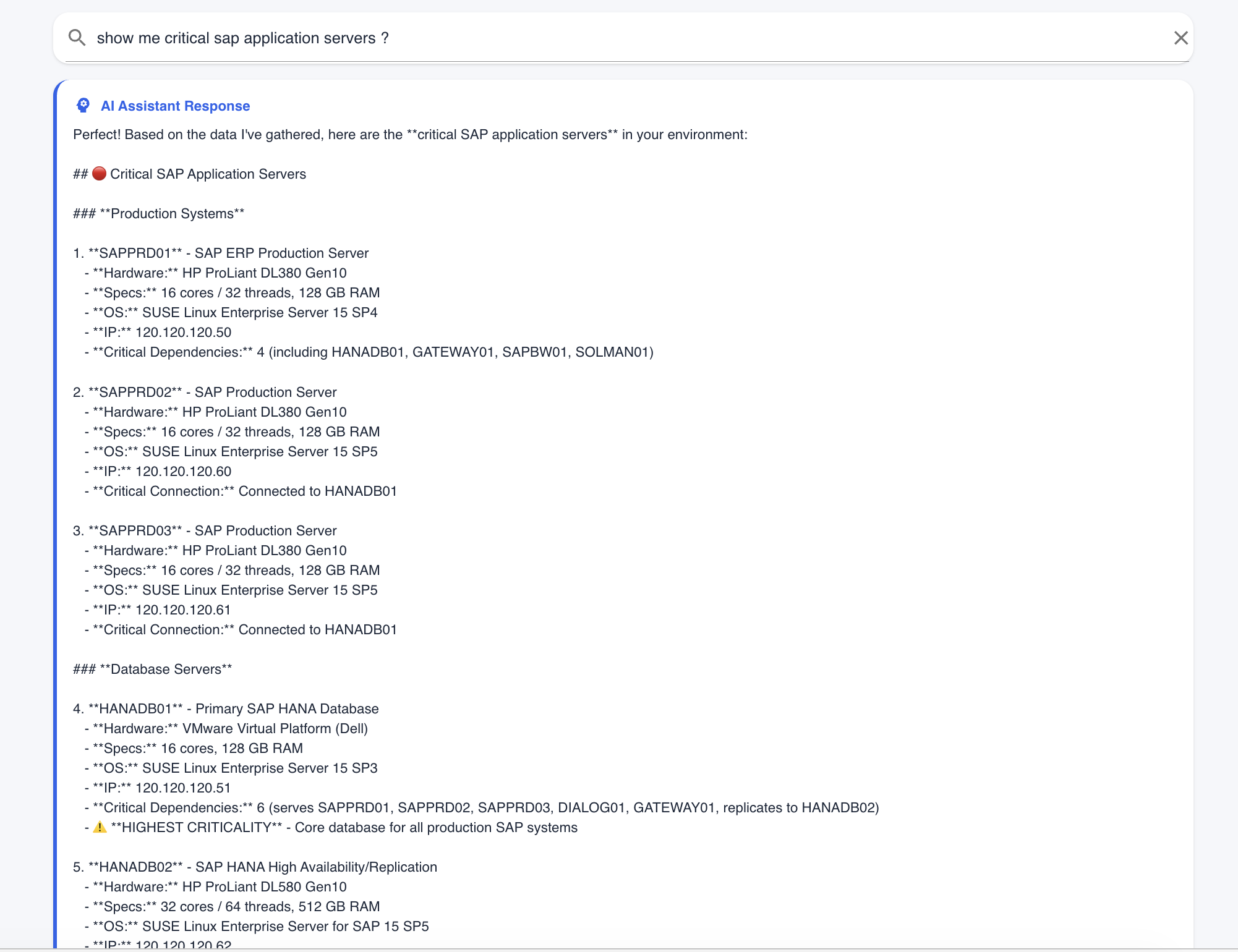 Complete inventory with hardware specs, OS versions, IP addresses, and critical dependencies — instantly.
The AI returns:
- Every critical SAP application server
- Hardware specifications and OS versions
- IP addresses and network location
- Critical dependencies for each server
- Database connections and replications
Time: 30 seconds.
How It Actually Works
Behind the scenes, Tripl-i translates your question into the right CMDB lookups, connects the relationships, and returns a single, plain-language answer.
When you ask "What connects to HANADB01?", the system:
- Recognizes intent - You want connections and dependencies
- Finds related systems - Everything that talks to that database
- Highlights what matters - Criticality, impact, and context
It's not keyword guessing. It's your CMDB, interpreted for humans.
The result: answers grounded in your actual CMDB data - not guesses.
The Migration Impact Example
This is where it gets interesting.
Question: "How can I upgrade ns-monitor-01? Which services will be affected?"
What the AI Returns:
| Section | Details |
|---|---|
| System Overview | Server specs, OS, IP, current role |
| Impact Assessment | Overall Risk Level: HIGH (70/100) |
| Critical Systems Affected | 2 systems with critical business impact |
| Total Impact | 10 systems affected, including monitoring tools and utilities |
| Upgrade Recommendations | Pre-upgrade checklist, backup steps, notification plan |
This isn't a report you have to interpret. It's a direct answer to "what do I need to know before I touch this server?"
The CAB no longer has to guess. The architect no longer has to dig. The answer is just... there.
What Changes
| Before | After |
|---|---|
| "Let me check the CMDB and get back to you" | "Let me ask" |
| Export → Filter → Pivot → Squint | Type a question |
| Tribal knowledge required | Anyone can query |
| 30-60 minutes per question | 30 seconds |
| Answers depend on who you ask | Answers come from data |
Your CMDB finally becomes what it was supposed to be: the single source of truth that anyone can access.
The Question You Should Be Asking
Your CMDB already knows what connects to your databases. It knows where your critical applications run. It knows what will break if you change that server.
The question is: can your team access that knowledge — or is it locked behind query languages and complex interfaces?
Your infrastructure has a story. Now you can just ask it.
AI-Powered Semantic Search is available now in Tripl-i. Ask questions in the search bar on any page, or try the Global Infrastructure Workbench for visual topology exploration. The AI uses your existing CMDB data - the better your discovery and service mapping, the better the answers. See the documentation or try it yourself: just type a question.