Your CAB is Guessing. Here's What They're Missing.
Last month, a routine database upgrade took down an ERP system for 6 hours. The change was approved as "low risk." Nobody knew the database served 14 application servers, 3 business-critical services, and 2,000 users.
The information existed. It was in the CMDB. But nobody connected the dots.
The CAB Problem
Change Advisory Boards make decisions based on what people remember, not what systems know.
A typical CAB meeting:
- "Who owns this server?" → Silence
- "What else depends on it?" → "I think maybe the reporting system?"
- "What's the blast radius if this fails?" → Shrugs
The CMDB has the answers. But it's buried in relationship tables nobody queries. So the CAB approves based on gut feeling, and hopes for the best.
Hope is not a change management strategy.
What Goes Wrong
We reviewed 50 failed changes across 3 enterprises. The patterns were consistent:
| Root Cause | Frequency |
|---|---|
| Unknown dependencies | 62% |
| Underestimated downtime | 24% |
| Wrong maintenance window | 8% |
| Missing rollback plan | 6% |
62% of failures came from dependencies nobody documented. The server was "standalone" in the change request. In reality, it was a linchpin.
A Different Approach
We built the AI Change Manager because we got tired of watching CABs guess.
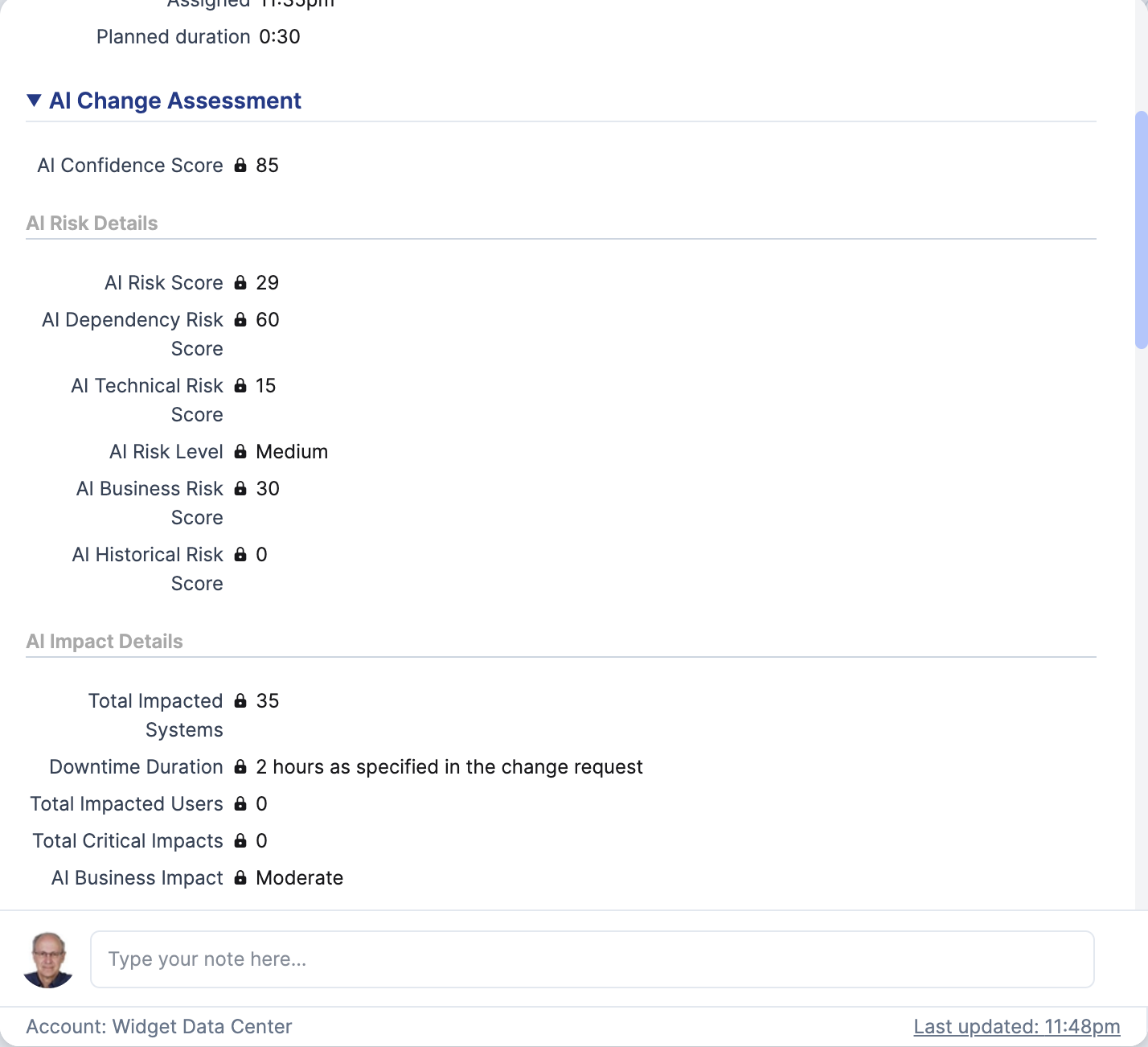
When a change is created in Xurrent (4me), Tripl-i's AI automatically:
- Identifies all affected systems - not just what's in the ticket, but everything connected to it
- Calculates risk scores - technical, business, dependency, and historical
- Estimates real downtime - based on complexity, not optimism
- Generates recommendations - specific actions for before, during, and after
Results appear in Xurrent within 30 seconds. No manual lookup. No guessing.
Inside the Analysis
The AI evaluates four risk dimensions:
Technical Risk
How complex is this change? Is it a simple config update or a multi-step migration? What could go wrong technically?
Business Risk
Which business services depend on this system? What's the revenue impact if it fails? Who needs to be notified?
Dependency Risk
What's connected to this CI? The AI maps network connections, software dependencies, and service relationships. That "standalone" database? It actually serves 14 application servers.
Historical Risk
Have similar changes failed before? What patterns exist in past incidents? The AI learns from your change history.
Real-World Scenario
The Change Request: Upgrade SQL Server on DBPROD01
What the ticket said:
- Low risk
- 1 hour maintenance window
- Affects: DBPROD01 only
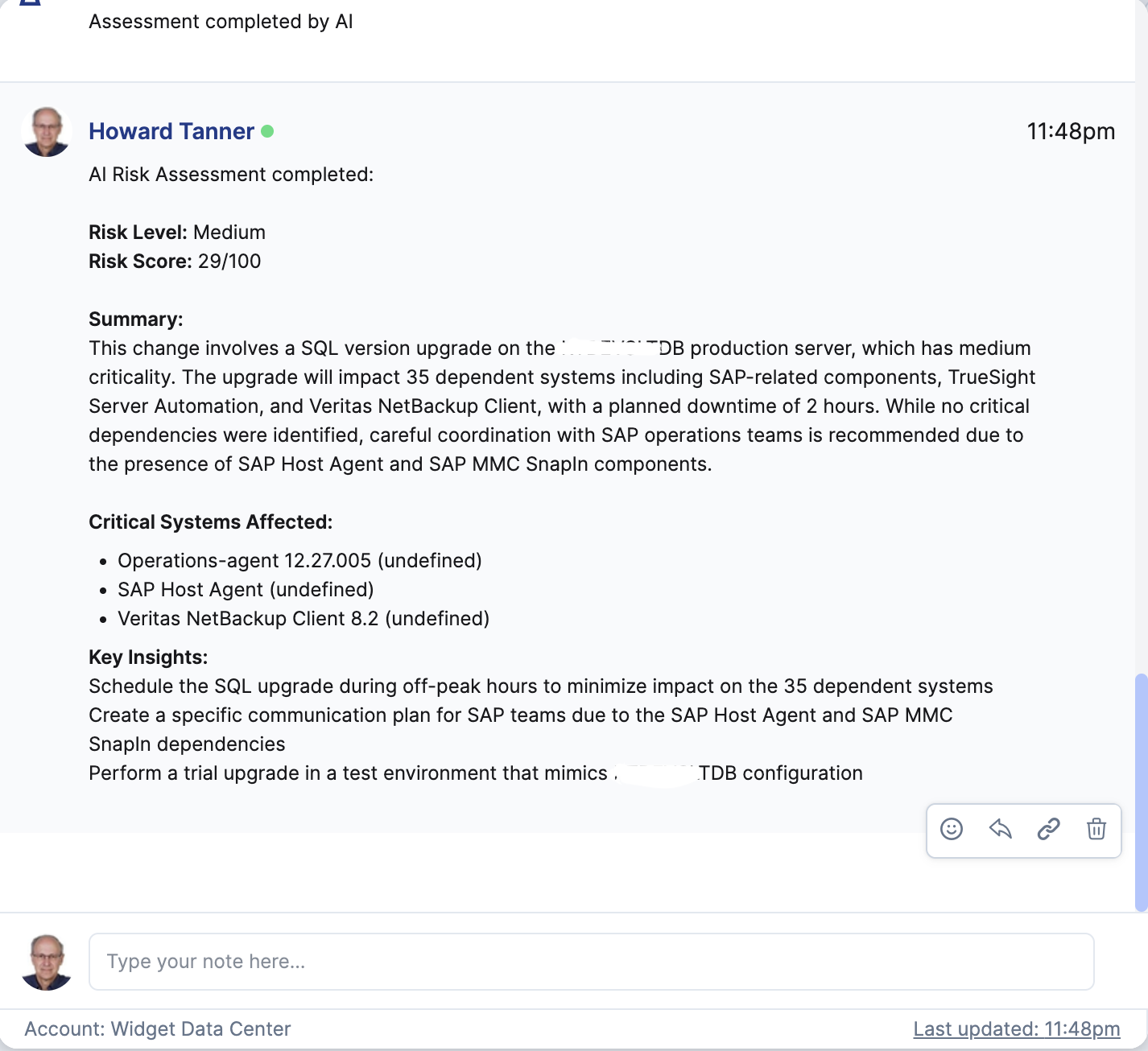
What the AI found:
- 12 application servers connect to this database
- 3 business services depend on it (ERP, Reporting, Customer Portal)
- 2,400 users will be affected during downtime
- Similar change failed 6 months ago due to replication lag
- Recommended window: Saturday 2-5 AM (lowest user activity)
- Risk-adjusted time: 2.5 hours (not 1 hour)
The CAB now has data, not guesses. They can make an informed decision.
What the CAB Actually Sees
Every change request gets enriched with:
| Field | What It Tells You |
|---|---|
| AI Risk Level | Overall classification (Low/Medium/High/Critical) |
| Affected Systems | Total count of impacted infrastructure |
| Critical Impacts | Systems that would cause major business disruption |
| Affected Users | Estimated user impact range |
| Recommended Window | Optimal time based on usage patterns |
| Pre-Change Actions | Specific steps before implementation |
| Post-Change Validation | How to verify success |
No more scrolling through CMDB reports. The analysis comes to the change request.
The ROI Question
"How much does a failed change cost?"
For most enterprises:
- Direct costs: Overtime, emergency support, lost transactions
- Indirect costs: Reputation damage, SLA penalties, user productivity
- Hidden costs: The next 10 changes get over-scrutinized because trust eroded
One prevented failure pays for years of tooling. But more importantly: your CAB stops being a bottleneck and starts being a strategic checkpoint.
From Gut Feel to Data-Driven
The best CABs we've seen don't argue about risk. They review what the data says and focus on mitigation.
Before AI Change Manager:
"I think this is probably safe. Let's approve it and see."
After AI Change Manager:
"The AI flagged 3 critical dependencies we missed. Let's add them to the communication plan and extend the window by an hour."
Same change. Different outcome.
Getting Started
The AI Change Manager integrates directly with Xurrent (4me). Setup takes about 15 minutes:
- Connect your Xurrent account
- Enable AI Change Manager
- Map your CI types to Xurrent products
From that point, every change request with Configuration Items gets automatic AI analysis.
No training required. The AI uses your existing CMDB data - discovery scans, network connections, service relationships. The better your CMDB, the better the insights.
The Question You Should Be Asking
Your next change request will get approved. The question is: will it be approved based on data or hope?
AI Change Manager is available now in Tripl-i with Xurrent integration. See the full documentation or contact us for a demo. Your CAB deserves better than guessing.